
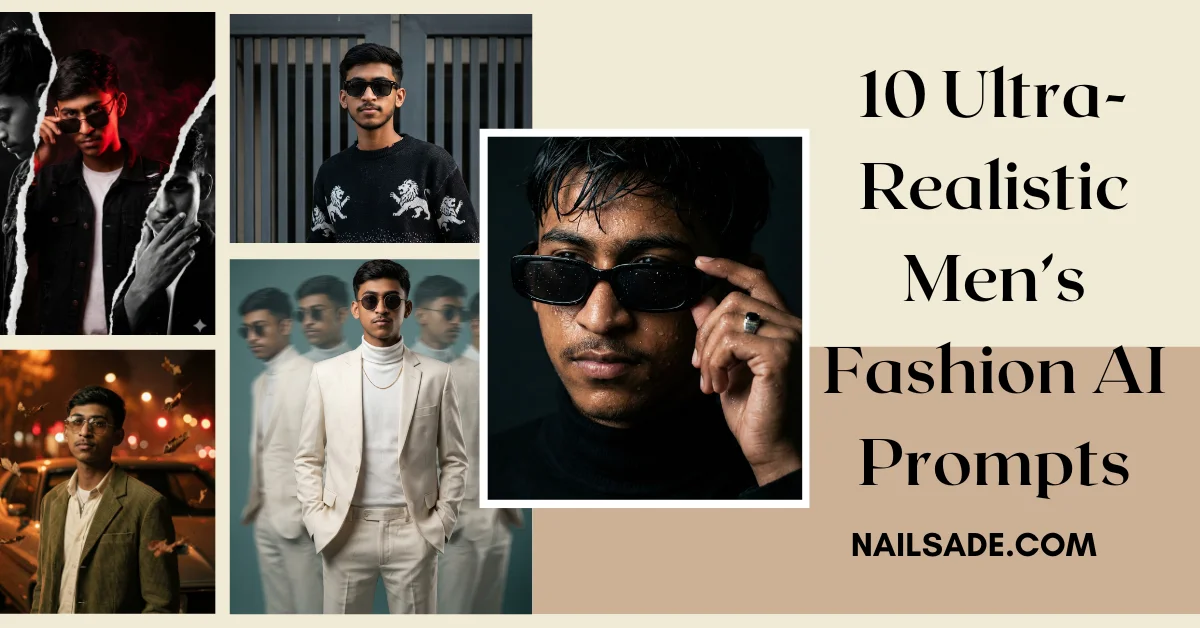
Are you tired of AI portraits that look waxy, inconsistent, or clearly generated? You are not alone. As we step into 2026, the standard for AI-generated imagery has shifted. Audiences scroll past “cartoony” images; they stop for cinematic men’s fashion AI art that looks like it was shot for Vogue or GQ.
The secret isn’t just the AI tool you use—it’s the prompt engineering.
In this viral guide, we reveal 10 copy-paste prompts that utilize advanced camera terminology, lighting physics, and the “Identity Lock” technique to guarantee consistency.
🇮🇳 Trending Now: Planning content for January? Don’t miss our viral guide on Republic Day 2026: Create Viral AI Posters with Your Own Face (5+ Best Prompts).
How to Create AI Photos with Gemini: The 2026 Workflow
Before diving into the specific fashion prompts, many users ask: “How do I actually do this in Google Gemini?”
Using Gemini (formerly Bard) for image generation is powerful because it understands complex nuances better than many other tools. Here is the exact USA-style workflow to get professional results:
Step 1: Open the Interface Go to the Gemini Advanced app or web interface. Ensure you are using the latest model (like Gemini 1.5 Pro or Ultra) which supports high-definition image generation (Imagen 3).
Step 2: Upload Your Reference (The Secret Sauce) To keep the face consistent, click the “+” icon or the “Upload Image” button. Select a clear, well-lit selfie of the person you want to portray.
Step 3: Structure Your Command Don’t just paste the prompt. You need to tell Gemini what to do with the photo you uploaded. Start your prompt with:
- “Generate a photorealistic image based on this uploaded face…”
- “Use the facial features from the attached image to create…”
Step 4: Paste the Prompt & Refine Copy one of the detailed prompts from the list below. If the result is too “digital,” add keywords like “raw photo,” “film grain,” and “4k texture.”
Step 5: Upscale & Download Once generated, click the “High Res” or “Download” button for the best quality.
The “Identity Lock” Rule (Crucial Step)
Most creators fail because their character’s face changes in every picture. To fix this, our prompts use a “CRITICAL IDENTITY LOCK” command.
How to use it:
- Upload a Reference: As mentioned in the Gemini steps above.
- Copy the Prompt: Paste the text below exactly.
- Don’t Touch the Lock: Do not remove the “Identity Lock” section of the prompt. This tells the AI that the face structure is non-negotiable.
Part 1: High-Fashion & Editorial Masterpieces
Perfect for: Luxury lifestyle blogs, brand mood boards, and magazine-style content.
1. The “Brutalist” Editorial

Why it works: It contrasts high-end organic textures (wool, suede) against raw, industrial stone.
Copy This Prompt: Full-body high-fashion editorial photography. CRITICAL IDENTITY LOCK (ABSOLUTE): Use the uploaded image as an EXACT, IMMUTABLE facial reference. Model & Pose: Brooding male model, leaning naturally against a massive weathered granite block wall. Outfit: Oversized dark brown wool pea coat with rich texture, layered grey button-down shirt, high-waisted pleated beige cropped trousers, suede Chelsea boots, and a subtle wide waist wrap. Environment: Brutalist urban architectural setting. Lighting: Strong chiaroscuro lighting, deep shadows. Color: Desaturated earthy tones, subtle sepia undertones, authentic 35mm film grain texture. Rendering: Ultra-realistic textures, natural fabric folds.
2. The Modern “Vogue” Studio Session
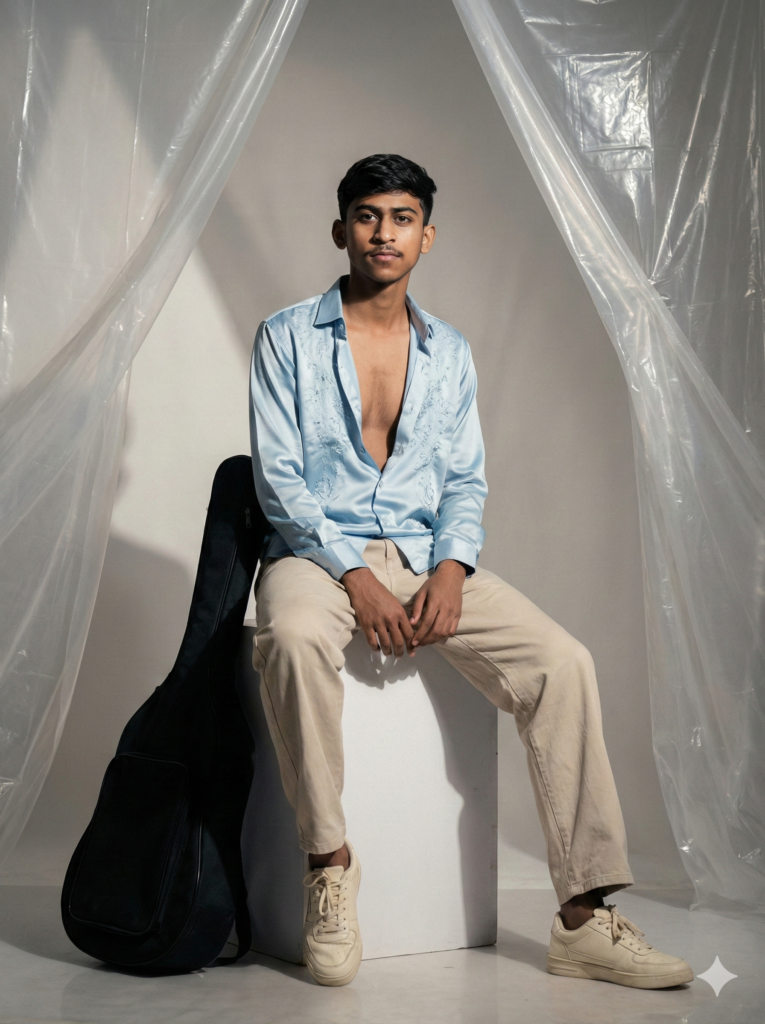
Why it works: It uses specific lens data (85mm) to create that blurry background (bokeh) that screams “expensive camera.”
Copy This Prompt: A hyper-realistic, cinematic fashion portrait. CRITICAL IDENTITY LOCK: Use the uploaded image as an EXACT facial reference. Model & Pose: Stylish young man seated casually on a white cube, posture relaxed, gazing slightly off-camera. Outfit: Open light-blue satin shirt with delicate embroidered detailing, beige loose-fit trousers, cream-colored sneakers. Props: A black soft guitar case resting against the cube. Environment: Minimalist raw tent-style studio with translucent plastic sheets. Lighting: Strong directional cinematic lighting from the left. Camera: 85mm lens, shallow depth of field. Quality: 8K resolution, HDR rendering, no digital look.
3. The Surreal “Time-Slice” Concept
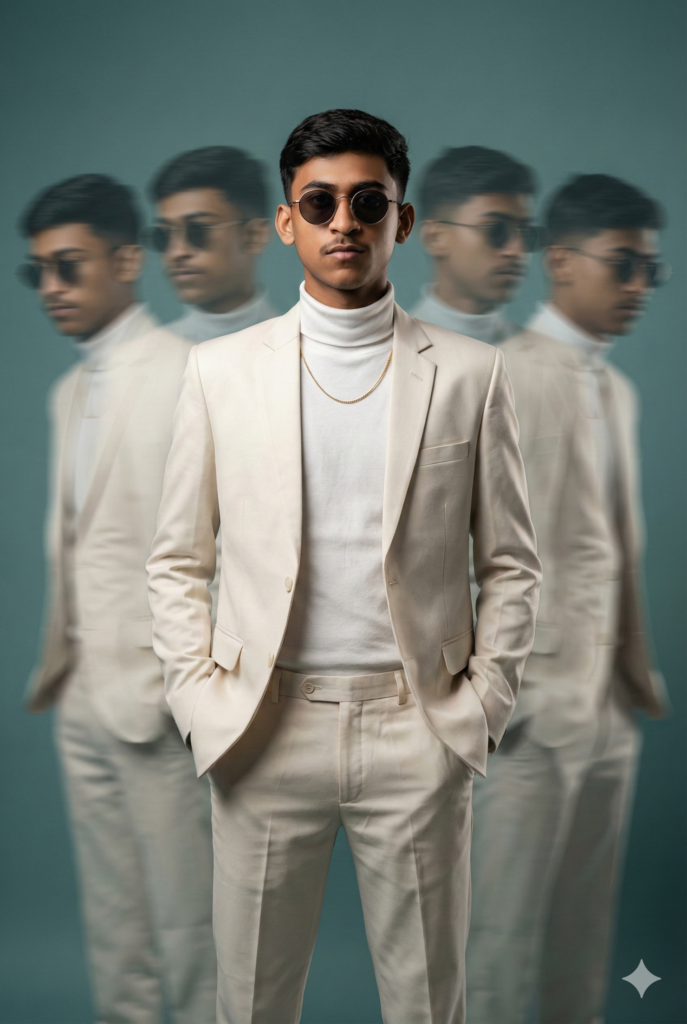
Why it works: This is a scroll-stopper. It combines sharpness with motion blur, creating a complex image that users stare at longer (increasing your engagement time).
Copy This Prompt: A hyper-realistic cinematic fashion portrait of a young man standing perfectly centered against a muted teal studio backdrop. He wears an elegant off-white tailored suit paired with a fitted turtleneck, accented by a minimal thin gold chain. Round, dark-tinted sunglasses with a slim metal frame add a bold, high-fashion edge. The central figure is captured in razor-sharp focus, while exactly four blurred versions of himself surround him—two on the left and two on the right. These surrounding figures appear semi-transparent and motion-blurred. Lighting is cinematic and precise. Shot on an 85mm lens with shallow depth of field, high contrast, soft film grain, modern surreal aesthetic.
🌟 Want to Pose with Celebrities?
Fashion is great, but sometimes you want to go viral by standing next to icons. Check out our specialized guides for creating fan edits:
- For Music Lovers: Viral AI Trend: How to Create Ultra-Realistic Photos with Sidhu Moosewala & Diljit Dosanjh (2026 Guide)
- For Movie Buffs: How to Create Viral Bollywood Selfies with Gemini AI: The Ultimate 2026 Guide (SRK, Salman & More)
Part 2: Cinematic Textures & Mood
Perfect for: Showcasing skin details and emotional depth.
4. The “Wet Look” Noir Portrait

Why it works: Water is the hardest thing for AI to render. This prompt forces the AI to focus on “micro-details” like droplets, removing the plastic skin effect.
Copy This Prompt: Ultra-realistic, cinematic close-up portrait of a young man with wet, glistening skin and damp, messy hair falling naturally over his forehead. Subtle water droplets cling to his face and hair. He wears sleek rectangular sunglasses, lightly touching the frame; tiny water droplets are visible on the lenses. Dramatic low-key lighting with deep, moody shadows sculpts the face. Dressed in a black turtleneck. Shot with an 85mm lens at f/1.4, ultra-shallow depth of field, razor-sharp focus on the eyes. High contrast, tactile textures, hyper-realistic precision.
5. The Nostalgic 90s Romance

Why it works: Nostalgia is a massive trend in 2026. The “warm streetlight bokeh” keyword triggers a very specific, emotional color palette.
Copy This Prompt: A vintage romantic cinematic portrait of a young man standing beside an old classic car beneath flickering street lights at night. He wears an olive-green corduroy jacket layered over a soft cream shirt, accessorized with vintage-style sunglasses. The background melts into a dreamy blur of warm streetlight bokeh. A gentle breeze lifts a few dried autumn leaves. The lighting is bold yet moody. Cinematic composition with shallow depth of field, subtle film grain, and muted earthy tones.
Part 3: Urban Streetwear & Lifestyle
Perfect for: Influencer content and daily outfit inspiration.
6. The “Old Money” Summer Aesthetic

Why it works: “Old Money” and “Quiet Luxury” keywords ensure the AI generates high-quality fabrics rather than generic clothing.
Copy This Prompt: Create a medium-shot, eye-level ultra-realistic photograph of a stylish man using the attached image for the same face. He is leaning against a rustic wooden door with a brick wall background. He is wearing a terracotta orange short-sleeve camp-collar shirt, tucked into beige pleated tailored trousers, paired with white sneakers, dark rectangular sunglasses, and a thin gold chain necklace. The lighting is warm and natural daylight. Modern, classy, and relaxed, with realistic skin tones and natural fabric details. 256K resolution.
7. The Gritty Streetwear & Gate
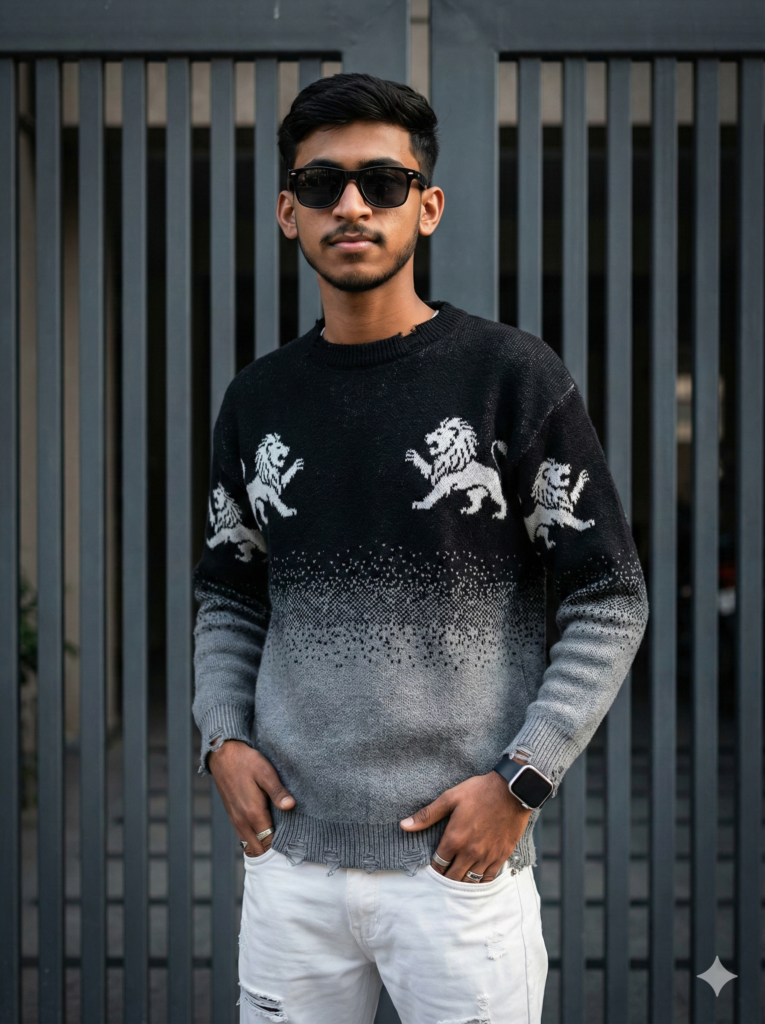
Why it works: By specifying “distressed gradient sweater,” you get a very modern, detailed texture that looks like real fabric.
Copy This Prompt: Create an 8K ultra-realistic portrait of the exact same person from the reference image. The man is posing confidently in front of a dark grey vertical slatted gate. He is wearing black sunglasses, a distressed black-to-grey gradient sweater with white lion patterns, and white ripped jeans. Accessories include an Apple-style watch and silver rings. Urban streetwear aesthetic, sharp focus, cinematic lighting, natural skin tones.
🏏 Cricket Fan?
If you prefer jerseys over suits, we have a dedicated guide for sports fans. 👉 Dream AI Photo: Create Viral, Ultra-Realistic Selfies with Virat, Dhoni & Sachin (The 2026 Guide)
Part 4: Creative & High-Impact Art
Perfect for: Album covers, posters, and viral social media posts.
8. The Dubai Desert Travel Shot
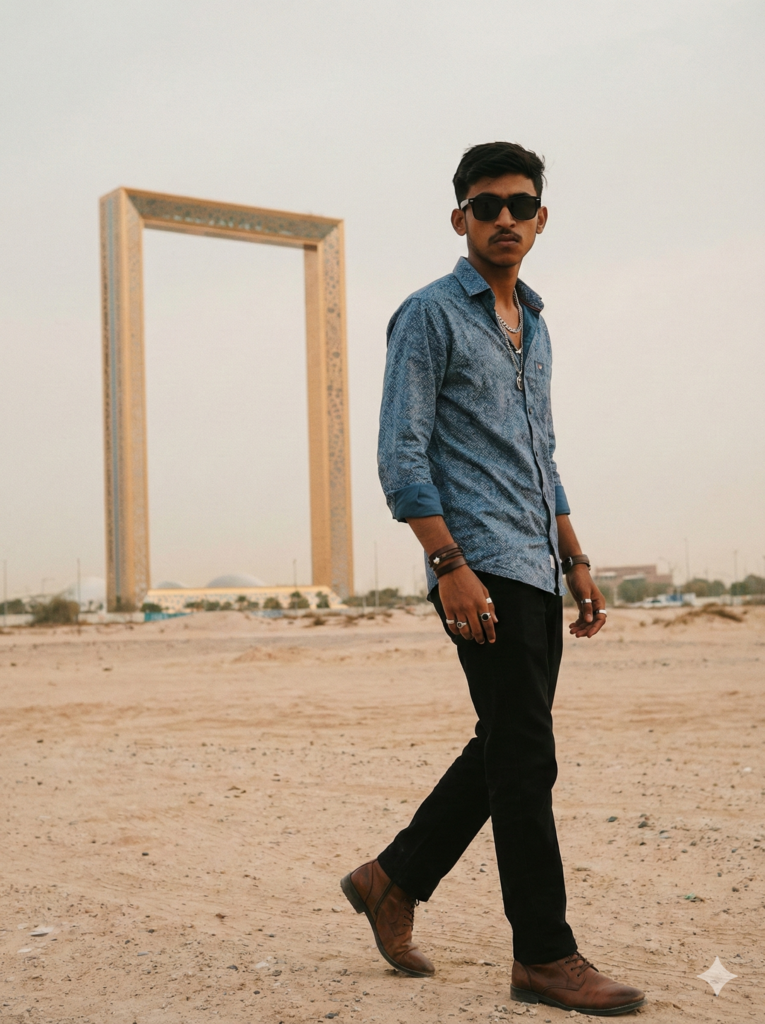
Why it works: It sets a “Gritty and Cinematic” mood, perfect for travel influencers who want consistency in different environments.
Copy This Prompt: Create a stylish young man using reference face with sunglasses, wearing a patterned blue shirt, black trousers, and brown shoes. He walks confidently away from the Dubai Frame. He has several necklaces, rings, and bracelets. The setting is a dusty and arid place with a pale, overcast sky. The overall aesthetic is gritty and cinematic, with a warm, desaturated color palette, suggesting a film still.
9. The “Dual Personality” Torn Paper Art

Why it works: This isn’t just a photo; it’s graphic design. The “torn paper” effect is incredibly difficult to do manually but easy with this prompt.
Copy This Prompt: 8K high-contrast portrait of a handsome young man, same face as the reference image. Center full-color portrait with red directional lighting wearing a black ripped denim jacket. On the left side, a monochrome torn-paper section shows him looking down. On the right side, another monochrome torn-paper section shows him raising his left hand. Torn-paper edges are thick and textured. Background is deep black with subtle crimson smoke. Mood is intense and bold.
10. The Young Corporate Luxury Look

Why it works: It targets the “Young Entrepreneur” niche. The 16K resolution keyword ensures the jewelry and silk textures are razor sharp.
Copy This Prompt: Ultra-realistic 16K HD full-body portrait of a stylish 16-year-old young man (face exactly matching the uploaded reference). He is wearing a light sleek yellow suit, unbuttoned blazer with a black silk shirt and black tie, paired with classy black shoes with brown square sunglasses. Background features a luxury corporate office interior with large glass windows, soft natural lighting, and a cinematic depth-of-field effect. High detail, sharp focus, clean look.
🔥 Want These Results Every Day?
The world of AI Art moves fast. Don’t get left behind with outdated prompts.
We drop exclusive, trending prompts and hidden AI tricks daily on our Instagram. It’s the fastest way to master tools like Gemini and Nano Banana.
Join the movement here: 👉 @promptyard_ai
Final Thoughts
Creating ultra-realistic AI portraits is about precision. By using the prompts above, you are not just “asking” the AI for a picture; you are directing it like a movie set.
Don’t forget: If you create something amazing using these prompts, tag us on Instagram! We love featuring the best art from our community.
👉 Follow for Daily Inspiration: instagram.com/promptyard_ai
